
The Telecom Domain Network (TDN) introduces a new way to model telecom infrastructure within the ArcGIS Utility Network. As organizations begin planning for adoption, a common question comes up: what does it actually take to move existing network data into this new framework?
While much of the conversation focuses on the structure of the TDN itself, the reality is that migration is less about the model and more about how existing data is translated, adapted, and rebuilt within it.
Mapping existing data into the TDN
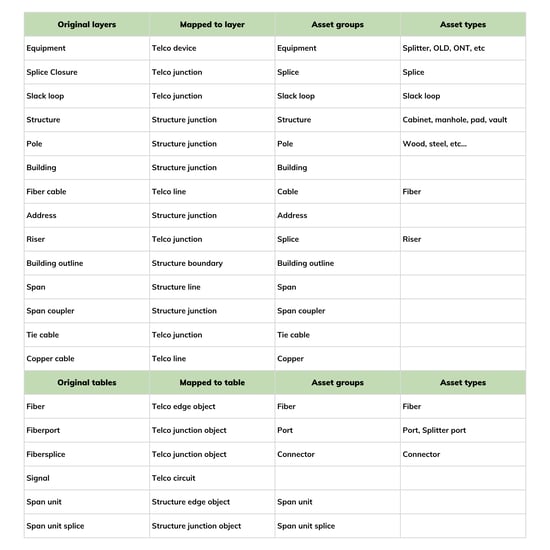
The first step in any migration is understanding how current data aligns to the TDN structure. The Utility Network provides standardized feature types such as lines, junctions, and devices. Existing telecom models, however, often store assets like fiber cables, equipment, ports, and splices in separate, purpose-built tables.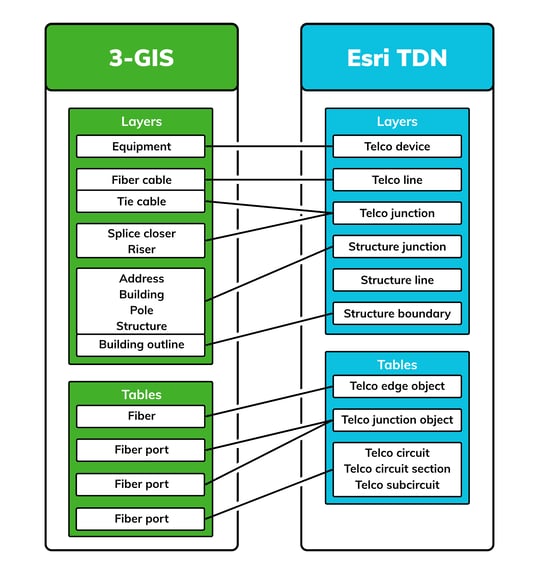
Moving into the TDN requires mapping those elements into the appropriate containers and assigning the correct asset types. This step is relatively straightforward, but it sets the foundation for everything that follows.
Preserving the data your workflows depend on
Data models used in production environments often support more than just asset tracking. They also support design workflows, construction tracking, and operational processes. Not all of that functionality is native to the TDN.
As a result, organizations must identify and carry over the fields and attributes required to support those workflows. Without this step, data may be successfully migrated, but critical processes may not function as expected.
Why connectivity is where the real work happens
Once data is loaded into the TDN, the next challenge is rebuilding connectivity. In many existing systems, connectivity is stored in proprietary structures, while within the Utility Network it is defined through associations between features.
This means relationships such as fibers to cables, ports to equipment, and splices to closures must be recreated within the network. More importantly, the connections that define how the network operates, such as fiber-to-fiber and port-to-fiber relationships, must be rebuilt in a format the Utility Network can understand.
Reconstructing network relationships
Rebuilding these relationships typically requires transforming existing data into new formats that can be imported into the Utility Network. This often involves:
- Restructuring source tables
- Generating association records
- Importing those associations to build the network index
Completing this step is what allows the network to support analysis, tracing, and the workflows that depend on an accurate picture of how assets are connected.
From migrated data to a working network
Once connectivity is properly established, organizations can begin using the full capabilities of the Utility Network. This includes running traces, analyzing paths, and supporting workflows that depend on an accurate representation of how the network is connected.
At this point, the data is no longer just present in the system. It becomes usable.
Using automation to support migration
In our first sample migration, we used an automated Python-based approach to handle two of the most important parts of the process: mapping existing features into the TDN structure and generating the connectivity associations required by the Utility Network.
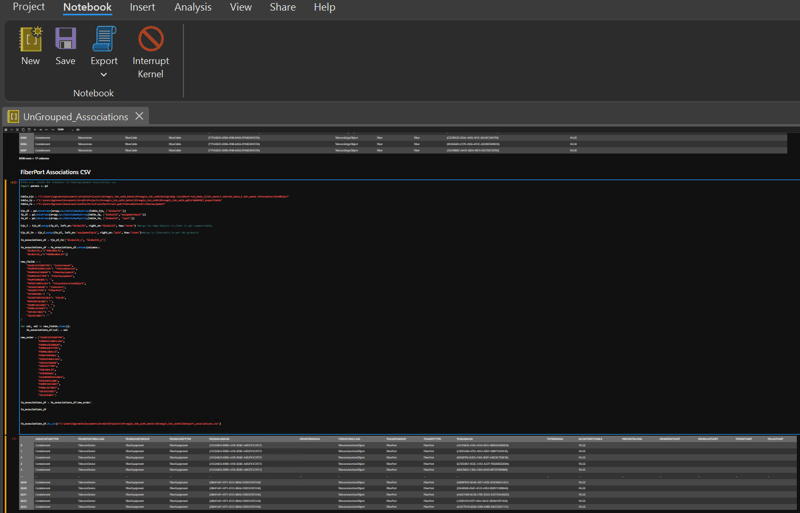
Using GeoPandas and supporting transformation scripts, we converted source data into repeatable outputs that could be validated before loading. This made the migration process more consistent and auditable while reducing the manual effort required to rebuild network relationships.
Where 3-GIS fits in
As organizations work through this process, experience with telecom data modeling, Utility Network behavior, and migration tooling becomes essential. 3-GIS has worked directly with the Utility Network and the Telecom Domain Network to map existing telecom data models, extend required attributes, and rebuild connectivity in ways that support real-world workflows. That experience helps reduce migration risk and ensures networks are not only moved into the TDN but continue to function as expected once they are there.